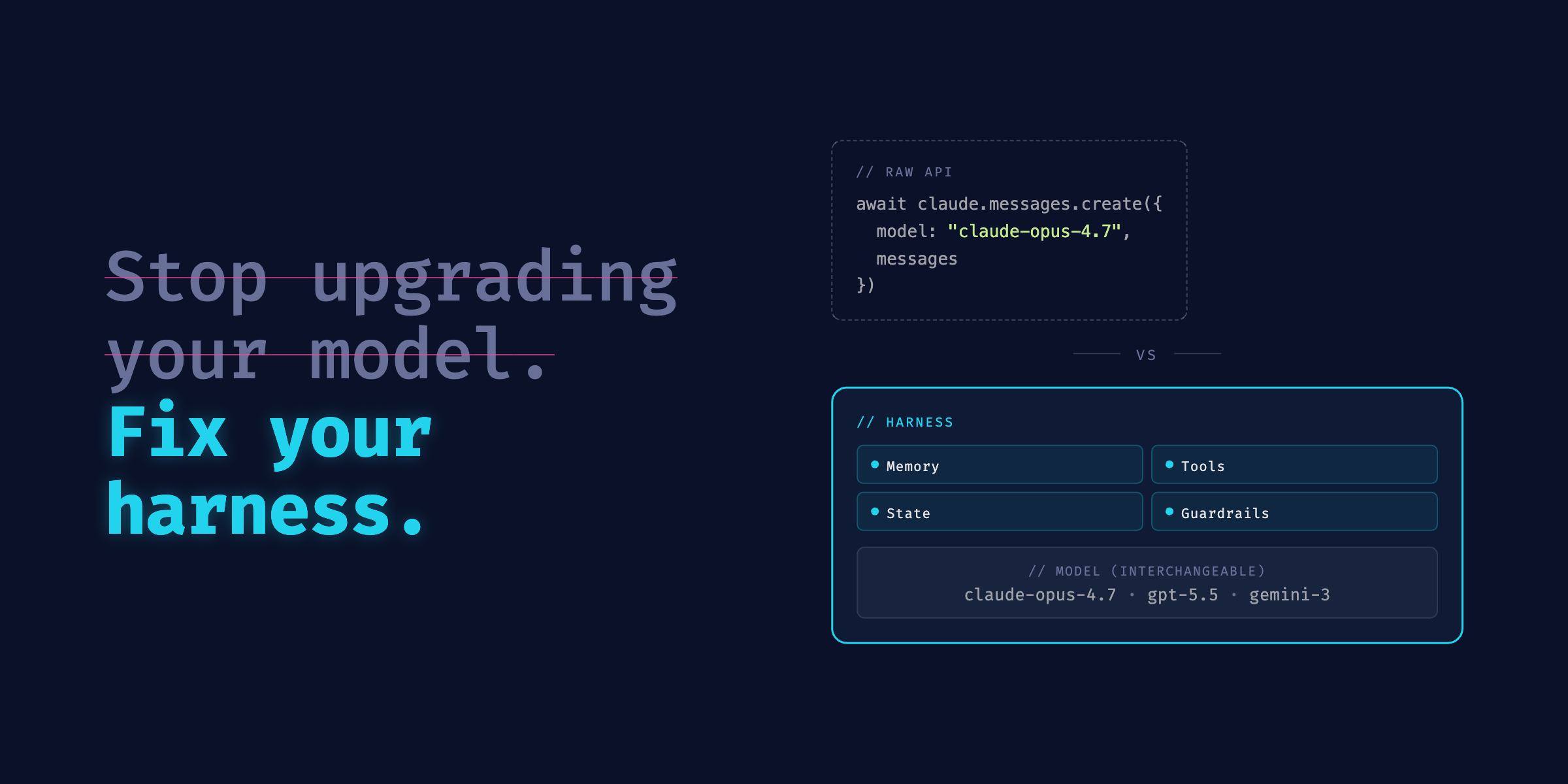
The word "harness" keeps showing up in AI agent conversations. Almost none of them stop to define it. If you're building with agents, it's worth pinning down, because once you understand what a harness is, the model selection debates start to look like the wrong argument entirely.
The gap between an API call and a working agent
The clearest way to understand what a harness is: compare making a Claude API call directly versus using Claude Code.
Both give you access to the same underlying model. The Claude API gives you a stateless text exchange: send a prompt, get a response, the model forgets everything. Claude Code is something very different. It has access to your filesystem, can run bash commands, reads and writes files across sessions, maintains persistent memory through CLAUDE.md files, runs subagents, and enforces stop conditions that control when it acts versus when it asks.
That gap is the harness. It's the layer of code that wraps a model and turns it into an agent. The same model accessed through the raw API would forget the previous turn the moment the response finished. The harness is what creates continuity.
What a harness actually gives you
When you're evaluating or building an agentic system, these are the layers the harness has to own:
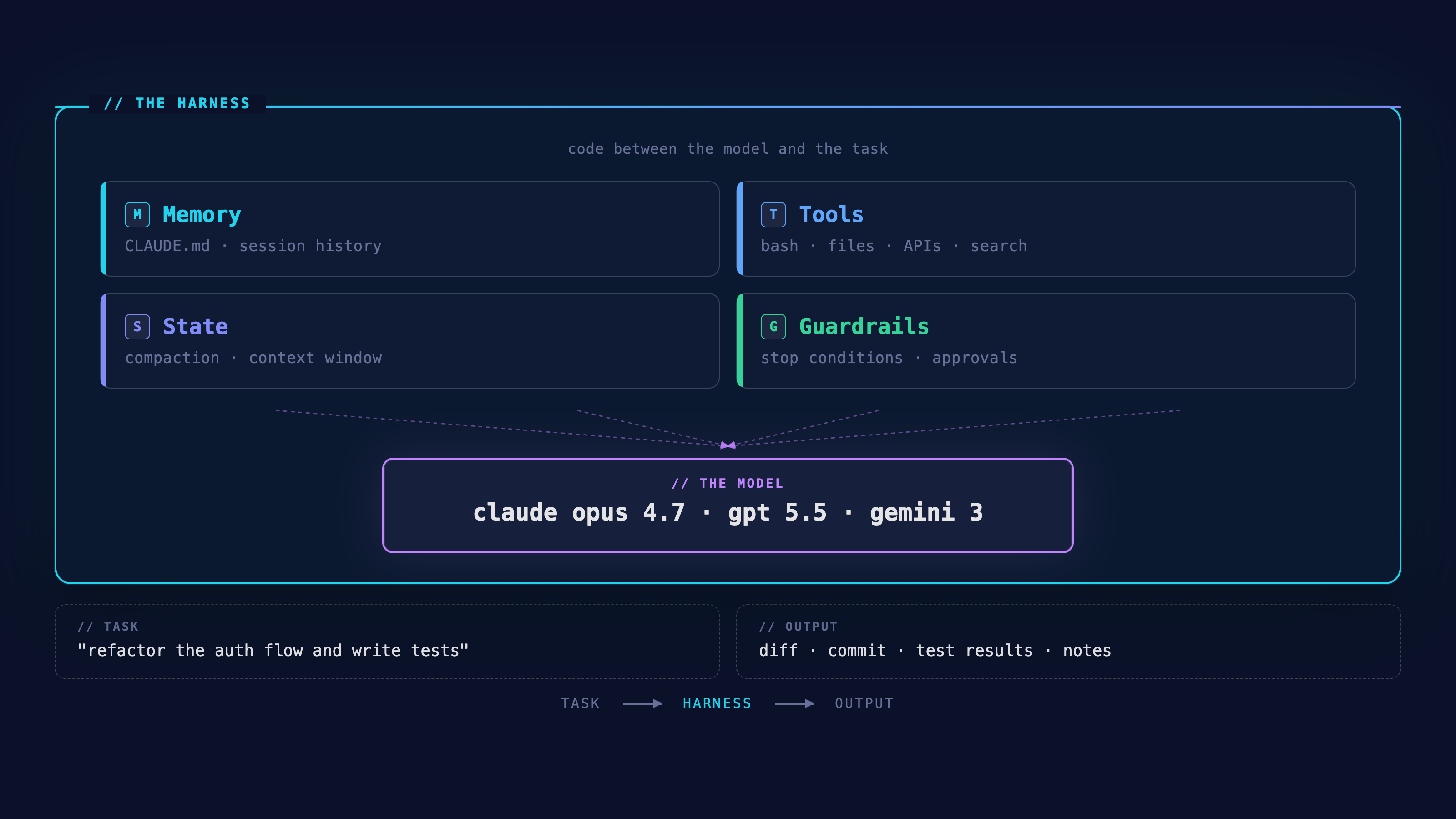
Memory across sessions. A model call has no memory by default. The harness decides what context gets injected at the start of every session, what gets written back at the end, and how accumulated knowledge is stored between runs. In Claude Code, this is file-based. CLAUDE.md files sit in your project directory, readable and editable by you.
Tools. Not in the abstract sense, but the specific operations the agent can execute: reading files, running shell commands, calling APIs, searching the web, writing to a database. The harness defines the tool surface area. A narrow tool surface produces a more predictable agent; a wide one produces a more capable one. Getting that tradeoff right is a harness decision, not a model decision.
State that survives across a task. Complex tasks don't fit in a single context window. The harness has to manage what gets preserved when a session ends, what gets summarized and compressed, and what gets discarded. This is one of the harder engineering problems in agentic systems, and most implementations either ignore it or handle it poorly. The symptom is an agent that loses the thread midway through a long task.
Guardrails that actually run. When does the agent stop and ask a human? What happens when it detects it's looping? Which tools require explicit approval before the agent uses them? These policies can be written into prompts, but prompt-level guardrails drift. The harness enforces them deterministically, at the architecture layer, not through instructions the model can reason around.
Why harness design beats model selection
The default assumption when an agent underperforms is to upgrade the model. That's almost never the right first move.
Every tool in this space pitches some version of the same thing: better orchestration, smarter routing, more specialized agents. The problem is almost always scaffolding quality: how context is managed, how memory passes between agents, whether the tool surface fits the task. Adding more layers doesn't fix that. I keep a running list of what I've tried on my tools page if you want to see what's worth looking at.
Before switching models, check these four things.
System prompt length. A 450-line system prompt produces measurably worse behavior than a 100-line one with real examples. Vague instructions at scale fragment attention.
// Too long
You are a helpful assistant that assists with many tasks. You should always
be polite and professional. When answering questions, consider all angles.
Make sure to be thorough but also concise. Never make assumptions. Always
ask for clarification when uncertain. Format responses clearly...
[400 more lines of vague instructions]

// Tight
You are a code reviewer. Flag bugs, security issues, and style violations.
Return JSON: {"issues": [{"line": number, "type": string, "message": string}]}
Example: {"issues": [{"line": 42, "type": "security", "message": "SQL injection risk"}]}
A short prompt with a concrete example outperforms a long one with descriptive rules.
Context management. Without compaction, long tasks degrade as older turns crowd out what the agent needs to act on now.
// Unmanaged
messages.push({ role: "assistant", content: fullResponse });

// Managed
if (tokenCount(messages) > 80000) {
  messages = [summarizeOlderTurns(messages.slice(0, 10)), ...messages.slice(10)];
}
Most agent failures on long tasks aren't model failures. They're context failures.
Tool descriptions. The model decides whether to use a tool based on its description. Vague descriptions produce inconsistent tool use.
// Vague
{ name: "bash", description: "Runs bash commands." }

// Useful
{ name: "bash", description: "Runs shell commands. Use to execute code, read file contents, or verify system state. Do not use for string operations you can handle directly." }
The description should tell the model not just what the tool does, but when to reach for it.
Stop conditions. An agent without stop conditions runs until it hits a hard limit, and output quality degrades the longer it runs unchecked.
// No stop condition
while (true) {
  response = await agent.run(task);
}

// Explicit stop
for (let attempt = 0; attempt < maxAttempts; attempt++) {
  const response = await agent.run(task);
  if (["complete", "failed"].includes(response.status)) break;
  if (detectLoop(response, history)) throw new Error("Agent is repeating steps");
}
Loop detection and a max attempt ceiling are the minimum. Most production failures come from agents that didn't know when to stop.
If any of those have bad answers, fixing them will do more than upgrading to the next model tier.
Claude vs OpenAI: where the harness differences actually show up
Once you've got the harness fundamentals right, model selection still matters, just less than most people think. Here's where Claude and OpenAI differ for developers building harnesses.
Prompt caching. Your system prompt (the persistent context, memory injections, tool definitions) is often identical across hundreds or thousands of agent turns. Claude's prompt caching lets you cache that block and pay roughly 10% of the normal input token cost on cache hits.
import Anthropic from "@anthropic-ai/sdk";

const client = new Anthropic();

const response = await client.messages.create({
  model: "claude-opus-4-7",
  max_tokens: 8096,
  system: [
    {
      type: "text",
      text: persistentContext,
      cache_control: { type: "ephemeral" }
    }
  ],
  messages: [{ role: "user", content: task }]
});
cache_controlmarks the system prompt for caching. Subsequent calls with the same prompt pay ~10% of the normal input token cost.
For a harness running hundreds of agent turns per hour, the savings add up fast. OpenAI's Responses API achieves something similar through server-side state, but through different mechanics and with different portability implications.
Reasoning control. Before a model responds, it can think through a problem internally: working out steps, checking assumptions, considering edge cases. That internal process is reasoning, and it costs tokens. Claude exposes it as a configurable parameter. On Opus 4.7, reasoning is adaptive (the model decides how much to think based on the task rather than consuming a fixed budget).
const response = await client.messages.create({
  model: "claude-opus-4-7",
  max_tokens: 16000,
  thinking: {
    type: "adaptive"
  },
  messages: [{ role: "user", content: task }]
});
type: "adaptive"tells Claude to decide for itself how much reasoning the task needs. You're not paying for max reasoning on every turn.
Claude also exposes effort levels (low, medium, high, xhigh, and max) as a coarser control knob. Opus 4.7 added xhigh between high and max. This matters for harness design because you can tune reasoning intensity per task type: lighter effort for routine operations, heavier for complex debugging or multi-file refactors, rather than running everything at the same cost.
OpenAI routes reasoning internally and doesn't expose direct control over it. With Anthropic, you set effort per task. With OpenAI, the model decides for itself.
Tool instructions. How you write tool instructions has a larger effect on agent behavior than most people expect. Capable models will often think through a problem before reaching for a tool, which is usually what you want. But it means your harness needs to be explicit about when tool use is required rather than optional:
// Too vague
Check whether the API endpoint returns the correct schema.

// Explicit
Use the read_file tool to open schema.json, then use the bash tool
to run the test suite and verify the output matches that schema.
The first leaves the agent to decide whether to act. The second names the tools, the files, and what to check.
This principle extends to running subagents (separate agent instances your harness kicks off to handle tasks in parallel). If your harness depends on that parallel execution across multiple files or items, specify it explicitly. Don't assume the model will split the work on its own.
The memory question nobody asks early enough
Switching models is easy. The APIs are similar enough that moving from Claude to GPT or back is a few hours of work. Models are stateless (each request starts fresh with no memory of previous interactions), so there's nothing accumulated to lose.
Memory is different. Once an agent has built up context over weeks or months, your codebase conventions, your debugging patterns, how you prefer things structured, that accumulated state is doing the actual work. The same setup without the memory produces a noticeably worse agent. If that memory lives somewhere you don't control, you can't take it with you.
Claude Code's memory is file-based. CLAUDE.md files, project notes, session summaries all live in your filesystem. You can read them, edit them, commit them to git, and inspect exactly what the agent knows about your project. When a long session gets compacted, the summary goes into a file.
I think about this the same way I think about using Obsidian for my own knowledge management. Notes in Markdown files I own, stored locally, not locked in a platform I'm renting. The agent equivalent is the same idea. Intelligence that accumulates in your filesystem, not theirs. A second brain you actually control.
OpenAI's Codex generates compaction summaries that are encrypted and not portable outside the OpenAI ecosystem. Whatever context your agent accumulates stays in their infrastructure.
Before you commit to any agent tool for production use, ask:
- Where does state actually live, and do I own those files?
- What survives session compaction, and what gets lost permanently?
- Are compaction summaries readable, or are they opaque?
- If I switched providers in a year, could I take the agent's accumulated context with me?
Most people don't ask this until they're already paying the switching cost. By then the answer usually isn't good.
Pick your model. Own your memory.
Anthropic, OpenAI, Google, and several open-weight teams are all shipping capable models on short release cycles. That's not going to thin out. It means model selection will stay a decision, just a narrow one. The distance between the top model options is smaller than the distance between a well-engineered harness and a poorly engineered one.
Switching the model is a small change. The context your agent builds up over months is what's hard to replace: how your codebase is structured, how you like things handled, what to skip. Keep it in files you own.
For deeper coverage of where current models stand on benchmarks and pricing, see the AI Models Guide.